Connect with Blair:  
DeliciousStumbleUponTwitterFacebookRedditLinkedInSphinn It!

faq_buttonBefore you look at any of these Questions & Answers — make sure your website meets the following System Requirements. If it does not meet any one of these requirements then Pretty Link won’t work for you:

  • Your site must already have pretty Permalinks working before the “Pretty Link” plugin will work. This means that on your “Settings”->”Permalinks” page you should have something other than “Default” selected as your Permalink structure.
  • PHP 4 or 5 — you’ll have a hard time running WordPress itself if you’re using anything other than PHP 4 or 5.
  • MySQL 4.1 and above — This one is critical. Pretty Link uses many advanced SQL queries that are not supported in versions prior to 4.1. If you don’t know how to check the version of your database, contact your system administrator. If you use a version earlier than 4.1, Pretty Link simply won’t function for you at all.
  • Javascript must be enabled on your browser.

Q. I installed your plugin and I’m getting a 404 error or the target URL is displaying improperly
A. This is by far the most common issue — luckily it should be pretty easy to solve. There are some things you can do to troubleshoot this though. Here are a couple of suggestions:

  1. The first thing you should do is make sure you have enabled pretty Permalinks in your WordPress Admin area. Click on “Settings” -> “Permalinks” and select anything other than default. Selecting a different Permalink structure tells WordPress to start rewriting URLs. I prefer using a Custom Permalink structure with just the post name: “/%postname%/” …
  2. Try your the target URL for your Pretty Link directly — make sure its correct and goes where you want it to go
  3. Check with your webhost to see if you are running on Apache with mod_rewrite enabled. Usually this is the case — especially if you have pretty permalinks working (if your permalinks are working but all start with index.php then WordPress may be using something other than mod_rewrite to create your permalinks). Pretty Link will not work without mod_rewrite enabled so you’ll have to work with your webhost to get it enabled on your site before this plugin will work.
  4. If none of these issues work for you then post the exact nature of your issue as a comment on this page.

Q. The graph on the “Hits” page is blank
A. There are 2 possible issues that could be preventing your Hit Graph from showing up:

  1. There is a conflict with another Plugin. To find out which plugin is preventing your graph from showing, disable all plugins other than pretty link, check the “Hits” page (if a plugin conflict is the issue then this should make the graph show up) to see the graph. Re-enable each of your other plugins one at a time checking the “Hits” page after you load each one until you see that your Graph has disappeared. Once you have narrowed it down to 1 or more plugins that conflict with Pretty Link, post a comment on this page letting me know so I can test Pretty Link against it.
  2. There is a database issue. If you suspect this is an issue, right click the blank report page and select View Source. Perform a search for “Fatal Error” on this page and let me know what the error was by posting it as a comment on this page

Q. If I have my wordpress install running out of a subdirectory of my website can I still use Pretty Link?
A. Absolutely — there are actually 2 ways you can do this. First, you can just install Pretty Link in WordPress and it will create links that use your subdirectory as a base (example: http://mycoolurl.com/mywordpressdir/xag) or second, if you follow the instructions on this page then you can actually create Pretty Links that hang off of your main domain name (example: http://mycoolurl/xag) even though your WordPress install is actually in a subdirectory.

Q. How do I pass parameters from my Pretty URL to my Target URL?
A. It’s actually quite straight forward. When you add or edit a link, click the “Advanced Options” link and then select the type of parameter forwarding you want to use. You have a couple of options:

  1. Standard Parameter Forwarding: Use this option if you want to pass parameters in the standard parameter syntax for URLs. For instance, if you had a Pretty Link URL http://blairwilliams.com/w7a and you wanted to pass it to a script with a few parameters here http://blairwilliams.com/bogusscript.php?id=45&product=4&sku=12 then you could just append the parameters to the end of your Pretty URL like so: http://blairwilliams.com/w7a?id=45&product=4&sku=12 and Pretty Link will forward the parameters to the target URL if you have this option selected. With this option, Pretty Link will merely forward any parameters it sees after the Pretty Link to the Target URL.
  2. Custom Parameter Forwarding: Use this option if you want the Pretty Link parameters to be in a format other than standard parameter syntax for URLs. WIth this option you have to define what format you want pretty link to use for parameters — for instance if you wanted to have your url be http://blairwilliams.com/w7a/45/prod/4/12 instead of http://blairwilliams.com/w7a?id=45&product=4&sku=12 then you could select this option and enter a custom URL format of /%id%/prod/%product%/%sku%. This custom string just tells Pretty Link that the first value after the slash is the id parameter, followed by a static word “prod”, the second value is the product parameter and the third value is the sku parameter. With this option checked and the custom format entered, Pretty Link would resolve http://blairwilliams.com/w7a/45/prod/4/12 to http://blairwilliams.com/bogusscript.php?id=45&product=4&sku=12.

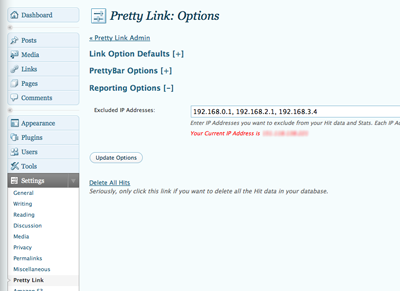
Q. How do I exclude IP Addresses from showing up in my Hit Report & Data Download?
A. Go to the Pretty Link options page from the top level WordPress admin page by clicking “Settings -> Pretty Link” and then click on “Reporting Options.” You’ll see a text field appear that will enable you to enter a comma separated list of IP Addresses. For your convenience, directly beneath this field you’ll see your current IP address (that’s usually the one you’ll want to exclude — of course).

picture-14

{ 1 trackback }

Wordpress plugins for affiliate websites : Travel Affiliate
October 21, 2009 at 4:54 pm

{ 198 comments… read them below or add one }

Austin Prime May 5, 2009 at 6:21 pm

@Blair Williams
All is good now. For some reason I had the permissions of the folder set to 777! DOH! :)

http://austinprimeonline.com/o2 < works like a charm!

Thanks for the plugin.
-Austin :)

Reply

Jimmy May 5, 2009 at 8:11 pm

Hi

Thanks for this extremely useful plugin. I have installed the plugin but the redirection is not working. The link redirects to the root of my hosting account. I contacted hostgator and they says that mod_rewrite is on by default. Do i need to add any rewrite rules? . The prety link in wuestion is http://asiswhereis.info/sober

Reply

Blair Williams May 5, 2009 at 8:27 pm

@Austin Prime
Glad its working for you now! I like the background graphics on your pretty bar — looks just like your website.

Reply

Blair Williams May 5, 2009 at 8:35 pm

@Jimmy
Do you have a folder in your root directory named “sober”? It appears to be taking me to a folder named sober — not a pretty link (also, just an fyi, your webhost is allowing directory listings — that is a security hole — I’d talk with them about it). Right now Pretty Link only checks for conflicts with your post, page, category and other pretty link slugs. Unfortunately, I don’t check for conflicts among actual directories or files yet (although I will be implementing this soon).

Reply

Austin Prime May 5, 2009 at 9:10 pm

@Blair Williams
Thanks! :) It’s all because of an awesome plugin! :)

Reply

Voitek May 6, 2009 at 12:01 am
Dmitry May 7, 2009 at 5:44 am

Hi Blair,
Thanks for the great plugin!
Unfortunately, have the save problem as Voitek – hits page
is blank, but the hits stats can be seen in the csv file. It’s OK.
Tried to deactivate other plugins – without help, and there is no “Fatal error” message.
Even tried to clear the hits data – still no graphs..

Reply

Blair Williams May 7, 2009 at 11:53 am

Voitek & Dmitry,
Pretty Link is having issues because for some reason, the SQL query it’s pulling for your reports isn’t working (that’s why you see 0 clicks on your report) … the CSV file uses different SQL queries and it looks like they are working. Do either of you have access to your apache error log? If so, it would be great if you could access your report page, copy the last few lines of your apache error log and send it to me. This will help me get a bug fix out to fix your issue.

Thanks!

Reply

Voitek May 8, 2009 at 11:05 am

Blair, thanks for all the help!

Unfortunately, for me is not working, but there is a progress. Look:
http://i248.photobucket.com/albums/gg180/rlsnews/01/pl-stasts.jpg

About the error log, where i can find it?

Reply

Voitek May 8, 2009 at 11:07 am
Dmitry May 8, 2009 at 3:43 pm

Just upgraded to the latest version (1.3.23) – yes, graph. report is working again! thanks!
But the hits table is still empty.

Reply

admin May 9, 2009 at 1:21 am

Voitek & Dmitry,
ooops… I only halfway fixed it — upgrade to 1.3.24 — I fixed the query for the hit table as well. Let me know how it works.

Reply

Voitek May 9, 2009 at 2:32 am

Yes! Working! Thanks man! Great job!

If you allow me, i whant to make a sugestion. In the links page:
admin.php?page=pretty-link/prli-links.php

I see:

Name Hits Group Created Links

Is there a way to have:

Name Hits Unique Hits Group Created Links

It would be great!

P.S. Blair, you are doing an amazing man! Congratulations!

Reply

Dmitry May 9, 2009 at 7:43 am

Great job, Blair – now it work like a charm!
Thank you very much for such a great tool and perfect technical support!
Keep it up!

Reply

Shauna May 10, 2009 at 12:10 am

Hi, I installed the upgrade 1.3.24 and now when I add a link, it says it was created successfully, but in fact it is not added and not listed as a Link. It was all working fine before the upgrade so I’m not sure where to begin hunting down this small issue.

Reply

Anthony May 10, 2009 at 6:40 pm

When I go to a link that I made with Pretty Link, it brings me to a white page. This happens with all of the links.

Reply

Blair Williams May 10, 2009 at 11:23 pm

Shauna — usually this happens when the plugin has been installed incorrectly, specifically, when the plugin has been uploaded and unzipped but not deactivated & reactivated. The deactivation / reactivation step is critical to the plugin functioning correctly and cannot be skipped … because that’s the step where the database can be upgraded. Hopefully, going through this step will fix your issue — let me know though if you have any other problems and I’ll see if I can help.

Reply

Blair Williams May 11, 2009 at 11:35 am

Anthony — first, you should make sure you aren’t creating your links with the “Track as Pixel” option checked. This option ignores the Target URL and just performs the tracking operation. If that isn’t the case then it would be helpful for you to send me some of the pretty links that aren’t working so I can troubleshoot them. Please provide the pretty links and the target URLs.

Reply

Antony May 28, 2009 at 3:22 pm

I have tried everything, but when the new version came out, it fixed itself

redfox May 11, 2009 at 1:46 pm

please? can someone check how this link works for you:
—> http://en.wikipedia.org/wiki/Heavy_Metal_(film)#Soundtrack
for me after creating “prettylink” and clicking it, it redirects to
http://en.wikipedia.org/wiki/Heavy_Metal_film#Soundtrack
how come (film) becomes film and there do “(” and “)” go?

Reply

redfox May 11, 2009 at 11:51 pm

how to exclude some IPs (visitors) in Pretty Link: Hits ?

Reply

redfox May 12, 2009 at 12:15 am

hi! its me again =)
shortcodes like [plink=1]….[plink=99] ([plinks=1,22,77,99]) to use in posts, do i have them ?

Reply

Blair Williams May 12, 2009 at 9:42 pm

redfox, Pretty Link doesn’t currently have this feature implemented but its at the top of my list so check back for updates.

Blair Williams May 12, 2009 at 10:12 pm

redfox — I added a paragraph and image on the FAQ (this page) that will tell you how to exclude IP addresses from your reporting.

Reply

Sam May 13, 2009 at 3:31 am

Howdy!
I´m not sure, can I make with this plugin my own tinyurl service to all public in wp-platform?
/ Sam

Reply

Blair Williams May 13, 2009 at 11:57 am

Sam, good idea — I’ve been considering this as a feature for a while now. I’ve got it on my list so check back as I update Pretty Link.

redfox May 13, 2009 at 1:39 pm

should i deactivate and activate plugin after upgrade or just rewriting files is enough ?

Reply

Blair Williams May 13, 2009 at 1:44 pm

redfox — you absolutely, positively need to deactivate & then reactivate PrettyLink when upgrading (and I’d recommend you do it with any other plugin as well). Overwriting the files is only half of the equation — when you deactivate / reactivate the plugin you are upgrading the database. So, if you don’t deactivate/reactivate you could be running with new plugin files but an outdated version of the database.

Paul May 18, 2009 at 9:18 pm

Hi. I’m using this in my theme for my blog listings and giving each entry a pretty link for the permalink. The problem I’m having is that every time the page refreshes, it duplicates the entire page of pretty links. I think that it should check if that url is already a pretty link and not duplicate it. Is there something I can change to make this happen?

prli_create_pretty_link(get_permalink(), ”, ‘name’, ‘description’);

Reply

Blair Williams May 18, 2009 at 11:11 pm

Paul, I’m not sure what you’re doing — are you using the API (I’m assuming since you talk about an API function)? That function should fail if a slug has already been used. If you could send me some code that you are using to access this API it may be helpful — or get me access to the page you’re having the problem with (you can just send it to me via the contact us form if you don’t want to post it as a comment)…

Trent May 20, 2009 at 6:11 pm

Blair, I would love to use this plugin.. If it worked. When I add a link, or a group, it says “…Successfully Created”, when in fact it created nothing. Any help would be much appreciated.

Reply

Trent May 20, 2009 at 6:53 pm

I was running MySQL 4.0.27. Dang! Nevermind, hopefully a simple upgrade will fix that..

Reply

Trent May 20, 2009 at 8:01 pm

Works now, yeah! Thank you very much!

Reply

Ali Hussain May 26, 2009 at 2:30 am

How can i enable pretty links to open in a new window?

Reply

Blair Williams May 27, 2009 at 6:19 pm

That depends on how you set your URL up as a link on the page using the anchor’s target attribute for instance:

<a href="http://blairwilliams.com/pl" target="_blank">My Cool Link</a>

This tells the browser to launch the pretty link in a blank browser window. Let me know if this helps.

moralde May 27, 2009 at 5:56 pm

Blair, I still can’t get over my excitement at this newly found plugin. One question: having just 3 characters for the pretty links, the probability of running out of unique combinations is there although it’s gonna take a really large number of links created before it happens. If I delete a pretty link in the admin page, will that particular pretty link be also deleted in the database, and can that pretty link be eventually used again for some other link?

Also, when I create a new link, a pretty link like “http://www.xxx.com/xyz” appears before I even enter a new url. Do I have the option to change that pretty link to, say, “http://www.xxx.com/ice”?

Reply

Blair Williams May 27, 2009 at 6:26 pm

In answer to your first question … with three characters in the slug there are a possible 46,656 slugs to choose from. Even the best marketers or twitterers would have a hard time reaching that number. And for your 2nd question — yes, Pretty Link just auto-generates the slug but you can change it to anything you want.

John May 29, 2009 at 5:42 pm

AWESOME!!!

I’m so happy I found this plugin.

It totally overdelivers.

Reply

Sami June 7, 2009 at 3:58 pm

Hi !

I own couple domains, witch are running on wp and are installed in same mySQL… Is it possible, that you can´t run pretty link more than one domain in same mySQL? It didn´t work with my case…

Great plugin…

/ Sami

Reply

Sami June 7, 2009 at 4:28 pm

Hi !

I got answer…. It was default address option in my wp in other site…
Works fine now…
My fault.

/ Sami

Kelly June 14, 2009 at 10:38 am

I have set up the pretty links properly, but my affiliate links are still showing when the pretty link is clicked. HELP?

Reply

Blair Williams June 14, 2009 at 10:55 am

Edit your pretty link, click link options, select ultra cloak and then hit save. Let me know how it works for you.

Kelly June 14, 2009 at 9:03 pm

Still no go. ??

Reply

Blair Williams June 14, 2009 at 10:20 pm

Some sites are able to break out of frames (I use frames to cloak your links). If you can send me your actual affiliate link via the contact form on this site then I can test it out to see if it breaks out of frames — unfortunately, if it’s able to do this then no amount of cloaking will work on it.

Peter Jennings June 17, 2009 at 9:46 am

Hi Blair,
I am using the pretty links with cloaking on and no follow with temporary redirect and forward parameters off. Is this ok for my affiliate links and will it pass through my affiliate ID’s to the affiliate networks to properley track my referral? I am unsure what parameters are? All I need is to be able to mask the affiliate links which it appears to be doing but I need to know if I need to pass on paramters or am I doing it right as it is?

Looks like a brilliant plugin, does it use a meta refresh as this can stop the affiliate links being recorded by the affiliate networks?

Many thanks

Peter

Reply

Peter Jennings June 17, 2009 at 9:49 am

Hi Blair,
Sorry I forgot to ask do I need to use a temporary or permanent redirect for affiliate links, seen your tutorial not sure if there is a cache problem or index problem with premanent redirection as the links are going out of my site and not to my site? Much appreciated if you can answer both my comments.
Regards,
Peter

Reply

Blair Williams June 17, 2009 at 12:51 pm

Thanks for the comments — I’ll try to break it down for you.

1. Parameter forwarding is used when you want to pass “dynamic” or “changeable” parameters to your target url — with most affiliate links, you get your affiliate link from the network you’re working with and it stays the same. So you don’t need Parameter Forwarding enabled … it should stay off — just make sure you have your full affiliate link included as your target url.

2. Since this link is going away from your site, I’d enable the nofollow attribute on this link and make sure it is a temporary redirect. There’s no reason to use a permanent redirect since this navigates away from your site and you really don’t want to pass google link juice to the network which is why I’d make the link a nofollow. Your stats on a temporary redirect will be more accurate than the permanent redirect anyway because caching servers will bypass pretty link with a permanent redirect in some cases.

Hope that helps!

Jean-Paul Horn June 20, 2009 at 9:20 pm

I would love to see an importer/exporter for Pretty Links. I’m using PL on more than one website which share the same setup. It gets a bit old setting all pretty links in all the different configurations. Will this be possible in the near future?

Reply

Blair Williams June 30, 2009 at 2:42 pm

This feature will release in the next few weeks with the pro version of pretty link. Keep an eye out for it.

Brett June 29, 2009 at 3:01 pm

How does this interact with SSL communications? What if I view a secured page at some point is the secure transmission lost due to the url being loaded under my non-ssl url ?

Thanks cool plugin!

Reply

Blair Williams June 30, 2009 at 2:47 pm

This would actually be a great one to do a screencast on… If you can setup your blog to use http and https (the http and https versions of each link on your site resolve to the same page) then you can actually create SSL pretty links (if your site is 100% ssl then you can create ssl pretty links as well — of course). I use this on a few of my websites where I’ve setup pretty link tracking pixels that I put on other secure pages. As far as forwarding goes though, if you forward from http to https then your destination page is still ssl, if you use the pretty bar or ultra cloak with an ssl target url then the target url is still ssl even though the user won’t see that it is. Hopefully that helps :)

Eric Severance June 30, 2009 at 10:26 am

Hi Blair,

I was thinking about writing a URL shortener for myself, then I ran across your plugin. Thanks for this!

I had a little trouble installing the plugin on my site though. I have my plugins directory symlinked outside of my WP directory. The register_activation_hook call failed for me, causing the database tables not to be created. To fix this, I modified the call to use ‘pretty-link/pretty-link.php’ rather than __FILE__ for the first argument.

register_activation_hook('pretty-link/pretty-link.php','prli_install');

Reply

Blair Williams June 30, 2009 at 2:48 pm

I’m always amazed at the different ways people are setting up wordpress — this might be a good change for me to make permanently… I’ll start playing around with it on some different configurations and hopefully you won’t have to keep editing files before the plugin will work :)

Aimee June 30, 2009 at 1:41 pm

Hi,

I upgraded WP to 2.8 and tried to have Pretty Links automatically updated, and receive this error: Parse error: syntax error, unexpected ‘(‘, expecting ‘}’ in /home/sites/myquickbuck.com/public_html/wp-content/plugins/pretty-link/classes/models/PrliLink.php on line 15

How do I fix this?

Reply

Blair Williams June 30, 2009 at 2:49 pm

Upgrade to pretty link 1.3.37 — I’ve got a fix in that release for this issue. I believe this was a php4 compatibility issue … Thanks for the heads up!

Aimee June 30, 2009 at 5:43 pm

That was quick! Thanks so much, it works again now :)

Dave Chartier July 3, 2009 at 5:27 pm

I hope I’m not missing something obvious here, but does Pretty Links have a bookmarklet for making it easier to create links? I’m thinking something like tr.im, bit.ly, and all the other similar services, where you can click a bookmark in your toolbar that creates a new page or popup with the shortened link already prepared. Some even auto-copy it to the clipboard. Thanks.

Reply

admin July 7, 2009 at 11:51 am

These are all features I have on my list — I’m just implementing them as they go :) … I installed the bit.ly toolbar and something like that for pretty link would definitely be possible — its only a matter of time before I roll it out. I’ve been working on the pro version of Pretty Links for several weeks now and will have many features bundled with it that will make life easier when sharing pretty links (although no toolbar yet). I have an API so if someone else wanted to write a toolbar like this then it would certainly speed up the release of something like this.

Beth M July 3, 2009 at 8:25 pm

My blog runs on two servers (one database). I uploaded and activated the Pretty Link plugin. My permalinks are set up as /index.php/%postname%/
My first link I set up as /0703 (the date). When I check it, it is 404. If I try to set it up as /index.php/0703 it tells me the pretty link slug is already taken.

What file does prettylink place the links in? I’m wondering if it’s posting on one server and I’m seeing the other one… (at least that’s where I’m starting)

Reply

admin July 7, 2009 at 11:55 am

Yeah, pretty link won’t let you override any of the files in the root directory of your wordpress install. I’m not quite sure why the /0703 would return a 404 error though. I’ll try to set one of my development wordpress sites to use that permalink structure and see if I can replicate the issue and push a fix.

生活时尚网 July 6, 2009 at 5:11 am

你好!Add nofollow to Link 我设置了,但是显示无效,还有就是后台统计不显示ip地址!谢谢你的插件!

Reply

admin July 7, 2009 at 12:02 pm

I put your comment into Google Translate and here’s what it generated — I’m not sure if it’s fully correct or not but I’ll attempt to answer it:

“Hello! Add nofollow to Link I set up, but the show does not work, there is the background statistics do not show ip address! Thank you for your plug-ins”

The nofollow option for Pretty Link actually adds an HTTP header — it isn’t able to add the rel=nofollow attribute to your links because it doesn’t create the full html link code — it only creates the URL. But the nofollow HTTP header should be just as effective. The issue with IP addresses not showing up in your statistics is bizzare — I’ve never seen that before. If you could send me some more information about your php settings I might be able to troubleshoot better.

Steven July 7, 2009 at 12:51 pm

My blog runs and is displayed from a subdirectory, like http://www.example.com/blog/. I’d like to create short links directly under the domain, e.g. http://www.example.com/slug. I read your Q above: “If I have my wordpress install running out of a subdirectory of my website can I still use Pretty Link?” but that only seems to apply when the blog, although running out of a subdir, is still displayed at the domain root. On my PrettyLink Add Link page, http://www.example.com/blog/ is now preset and I can’t change it. Something I can do “under the hood”?

Also under Settings -> Pretty Link -> Link Option Defaults -> Default Link Redirect Type, it says “Default newly created links to have permanent (307) redirection.” I believe this should say 301.

Reply

Blair Williams July 21, 2009 at 12:39 pm

Yeah — unfortunately there isn’t a super easy fix for that right now. You could place a .htaccess file in the root of your webserver that would rewrite any unknown urls to your wordpress install in blog. In theory it would be pretty simple but I haven’t had time to play around with it. :) I’ve got this on my list and so hopefully I’ll have a fix for this in the near future.

Paula July 22, 2009 at 8:24 am

Hi Blair

I have Pretty Links installed on my blog – but the image on the PrettyBar is showing as the top part of my blog rather than default logo/background image (I have the plugin on another site and it works OK!) I have tried different url’s for the logo and background image but it still does not want to play!

Any ideas – or is it just me being silly?

Kind regards
Paula

Reply

Blair Williams August 28, 2009 at 3:50 pm

This was an issue with urlencoding in the prettybar file and was fixed a while ago. Let me know if you have any other issues with it.

Dave July 29, 2009 at 11:51 am

Hi Blair – I have Amazon affiliate links with Pretty Link working no problem. However, I can’t eBay ones to work. If I visit my eBay-generated affiliate link directly in a browser all is well. If I create a Pretty Link and then click that link in my WP blog post, the redirect happens briefly, but then again immediately redirects to just the ebay.co.uk home page.

Just wondered if you had any idea why that might happen?

Many thanks!

Reply

Blair Williams August 28, 2009 at 3:51 pm

This was an issue with the URL length that pretty link accepted — it was truncated down to 255 characters … several versions ago, this limit was lifted — now you can use target urls that are thousands of characters long. Let me know if you have any further issues with this.

Jordi August 2, 2009 at 5:34 am

I like a lot your plugin… so… first of all Congratulations. The only thing it stops me to go to Pro is that I cannot specify the referral URL. If I use pretty link on the email, i will like to specify a referral url so I know that it comes from an email or.. much better, track this clic the way it comes from another url… It will be super useful for an affiliate link. The Affiliate will think it comes from the web page but… the true is that it comes from an email.

I hope you understands me.. my english is so weak… sorry…

Reply

Blair Williams August 28, 2009 at 3:55 pm

You actually can do this Jordi … Pretty Link records the referral url of every hit (where it can be determined) you can also setup parameters that are attached to the end of your pretty link that you can then sort in your hits. For instance if I had a url like: http://blairwilliams.com/thesis and wanted to use it in an email — I could actually embed this in the email: http://blairwilliams.com/thesis/e1 — the link would still redirect to the same place but the request url in your stats would show a path of /thesis/e1 … I’m coming up with some ways to make this more intuitive in the future though and to view better aggregate reports of these tracking parameters.

Patrick Seifried August 6, 2009 at 1:15 am

Dear Blair,

First of all – it is a great plugin and I really like it.

Here is my questions. Regarding the social networking I use Pretty Link for all links that I promote. Therefore I use the Hits as Traffic. But – why are the Hits not counted as visitors. If I have a look on google analytics they do not count the Pretty Link Hits as internet traffic. Is there any option that I have to enable?

Best wishes,
Patrick

Reply

Blair Williams August 28, 2009 at 3:58 pm

Right now, with Pretty Link, your links just redirect traffic (unless you’re using the pretty bar or ultra cloak) — so there’s no google compatibility layer — yet. I’m working on a way that people will have the option of pretty link redirecting to a page which loads the google analytics code and then immediately forwards them to the requested link. Stay tuned, this is on my roadmap right now.

Liza August 26, 2009 at 1:01 am

Hi,

I am using the most recent version of the plug in, and all the pretty links are giving this error when I use them:

Warning: Cannot modify header information – headers already sent by (output started at /home/lorelei/public_html/25/wp-content/themes/toptut/functions.php:67) in /home/lorelei/public_html/25/wp-content/plugins/pretty-link/classes/models/PrliUtils.php on line 217

Warning: Cannot modify header information – headers already sent by (output started at /home/lorelei/public_html/25/wp-content/themes/toptut/functions.php:67) in /home/lorelei/public_html/25/wp-content/plugins/pretty-link/classes/models/PrliUtils.php on line 280

Warning: Cannot modify header information – headers already sent by (output started at /home/lorelei/public_html/25/wp-content/themes/toptut/functions.php:67) in /home/lorelei/public_html/25/wp-content/plugins/pretty-link/classes/models/PrliUtils.php on line 281

It did work fine before, I didn’t change any settings, what could possibly be a problem?

Thanks!

Reply

Blair Williams August 28, 2009 at 3:58 pm

Liz, What version of the plugin are these error messages from?

Peaches August 28, 2009 at 3:19 pm

Yep, Liz, I’m getting the same problem after the 1.4.14 upgrade.

Reply

Peaches August 28, 2009 at 3:36 pm

I reverted back to the 1.4.13 and it fixed my prob until we get new fix. ;)

Blair Williams August 28, 2009 at 3:47 pm

Liz & Peaches — Can you send me the exact error you’re getting via my contact form? If you could send me a link that isn’t working it would be helpful too — so I can get a fix out. Peaches, are you using the same theme as Liz? It looks like it’s called “toptut”? Thanks!

Leave a Comment

You can use these HTML tags and attributes: <a href="" title=""> <abbr title=""> <acronym title=""> <b> <blockquote cite=""> <cite> <code> <del datetime=""> <em> <i> <q cite=""> <strike> <strong>