FAQ
Before you look at any of these Questions & Answers — make sure your website meets the following System Requirements. If it does not meet any one of these requirements then Pretty Link won’t work for you:
- Your site must already have pretty Permalinks working before the “Pretty Link” plugin will work. This means that on your “Settings”->”Permalinks” page you should have something other than “Default” selected as your Permalink structure.
- PHP 4 or 5 — you’ll have a hard time running WordPress itself if you’re using anything other than PHP 4 or 5.
- MySQL 4.1 and above — This one is critical. Pretty Link uses many advanced SQL queries that are not supported in versions prior to 4.1. If you don’t know how to check the version of your database, contact your system administrator. If you use a version earlier than 4.1, Pretty Link simply won’t function for you at all.
- Javascript must be enabled on your browser.
Q. I installed your plugin and I’m getting a 404 error or the target URL is displaying improperly
A. This is by far the most common issue — luckily it should be pretty easy to solve. There are some things you can do to troubleshoot this though. Here are a couple of suggestions:
- The first thing you should do is make sure you have enabled pretty Permalinks in your WordPress Admin area. Click on “Settings” -> “Permalinks” and select anything other than default. Selecting a different Permalink structure tells WordPress to start rewriting URLs. I prefer using a Custom Permalink structure with just the post name: “/%postname%/” …
- Try your the target URL for your Pretty Link directly — make sure its correct and goes where you want it to go
- Check with your webhost to see if you are running on Apache with mod_rewrite enabled. Usually this is the case — especially if you have pretty permalinks working (if your permalinks are working but all start with index.php then WordPress may be using something other than mod_rewrite to create your permalinks). Pretty Link will not work without mod_rewrite enabled so you’ll have to work with your webhost to get it enabled on your site before this plugin will work.
- If none of these issues work for you then post the exact nature of your issue as a comment on this page.
Q. The graph on the “Hits” page is blank
A. There are 2 possible issues that could be preventing your Hit Graph from showing up:
- There is a conflict with another Plugin. To find out which plugin is preventing your graph from showing, disable all plugins other than pretty link, check the “Hits” page (if a plugin conflict is the issue then this should make the graph show up) to see the graph. Re-enable each of your other plugins one at a time checking the “Hits” page after you load each one until you see that your Graph has disappeared. Once you have narrowed it down to 1 or more plugins that conflict with Pretty Link, post a comment on this page letting me know so I can test Pretty Link against it.
- There is a database issue. If you suspect this is an issue, right click the blank report page and select View Source. Perform a search for “Fatal Error” on this page and let me know what the error was by posting it as a comment on this page
Q. If I have my wordpress install running out of a subdirectory of my website can I still use Pretty Link?
A. Absolutely — there are actually 2 ways you can do this. First, you can just install Pretty Link in WordPress and it will create links that use your subdirectory as a base (example: http://mycoolurl.com/mywordpressdir/xag) or second, if you follow the instructions on this page then you can actually create Pretty Links that hang off of your main domain name (example: http://mycoolurl/xag) even though your WordPress install is actually in a subdirectory.
Q. How do I pass parameters from my Pretty URL to my Target URL?
A. It’s actually quite straight forward. When you add or edit a link, click the “Advanced Options” link and then select the type of parameter forwarding you want to use. You have a couple of options:
- Standard Parameter Forwarding: Use this option if you want to pass parameters in the standard parameter syntax for URLs. For instance, if you had a Pretty Link URL
http://blairwilliams.com/w7aand you wanted to pass it to a script with a few parameters herehttp://blairwilliams.com/bogusscript.php?id=45&product=4&sku=12then you could just append the parameters to the end of your Pretty URL like so:http://blairwilliams.com/w7a?id=45&product=4&sku=12and Pretty Link will forward the parameters to the target URL if you have this option selected. With this option, Pretty Link will merely forward any parameters it sees after the Pretty Link to the Target URL. - Custom Parameter Forwarding: Use this option if you want the Pretty Link parameters to be in a format other than standard parameter syntax for URLs. WIth this option you have to define what format you want pretty link to use for parameters — for instance if you wanted to have your url be
http://blairwilliams.com/w7a/45/prod/4/12instead ofhttp://blairwilliams.com/w7a?id=45&product=4&sku=12then you could select this option and enter a custom URL format of/%id%/prod/%product%/%sku%. This custom string just tells Pretty Link that the first value after the slash is the id parameter, followed by a static word “prod”, the second value is the product parameter and the third value is the sku parameter. With this option checked and the custom format entered, Pretty Link would resolvehttp://blairwilliams.com/w7a/45/prod/4/12tohttp://blairwilliams.com/bogusscript.php?id=45&product=4&sku=12.
Q. How do I exclude IP Addresses from showing up in my Hit Report & Data Download?
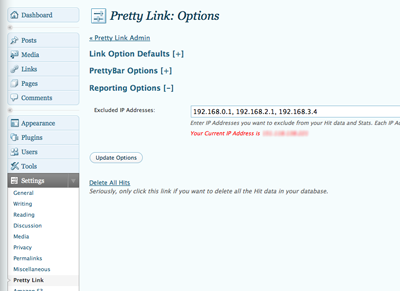
A. Go to the Pretty Link options page from the top level WordPress admin page by clicking “Settings -> Pretty Link” and then click on “Reporting Options.” You’ll see a text field appear that will enable you to enter a comma separated list of IP Addresses. For your convenience, directly beneath this field you’ll see your current IP address (that’s usually the one you’ll want to exclude — of course).


{ 1 trackback }
{ 198 comments… read them below or add one }
← Previous Comments
great plugin blair… thanks!
initially we couldn’t get pretty link to work
on one of our sites even though we were
using the custom structure permalink
(non-default) settings as recommended…
turned out that it was as a result of the
.htaccess file not being writable.
once we copied the code that wordpress
so kindly provided at the bottom of the
permalinks settings page into our .htaccess
file… voila, it began to work like a dream!
thanks again!
jairus
I have a problem in that it says:
This link isn’t being tracked – and there is a big red cross next to the links I have created, have the posts set up to something other than default so do’nt know what is wrong. Do I really have to disable all my plugins to see if there is a conflict?
Please help!
Thanks for email reply, did what you suggested, created new links and they are tracking now, must have done something wrong to start. I did create them from within market samurai so that must have caused the problem. Maybe doing them manually is the best option.
Great plugin and support, thanks for creating it!
Are there any examples of real world uses in a bit.ly or tinyurl.com type site?
Previously created pretty links are working but can’t create new ones – on any site. Says
* ERROR: Link URL must be a correctly formatted url
No matter what I do I get this error even if I leave the default slug there.
Suggestions??
Thanks
Don’t understand – kept trying and now it works! So never mind my question unless you have some magical power to tell my why it didn’t work and all of a sudden 5 or so minutes later, it does!
Cathy
Well, as it so happens, I do have magical powers — but not to tell you what happened here
… Sometimes web browsers get into weird states — and at those times you just need to clear your cache, cookies, etc and try again.
I don’t know if I’m using your plugin correctly but what I was trying to do was convert a clickbank hop link in my post (using a hyperlink) into a pretty url that cloaked my affiliate id. I put the clickbank hop link into the target url slot and my prettylink is basically the hyperlink word.(http://www.mydomain/keyword) When I click on the pretty link, the target’s url still comes up with my affiliate id. Nothing different than before.
Some links can’t be cloaked because they employ frame breaking technology. You’ll probably want to contact the creator of your landing page to see if they can make it cloak-able.
Great pluggin
I have the same problem, my affiliate id is still on the affiliate landing page.
Did you manage to solve this?
Thanks
Dean
I do not see the display options( pretty bar and cloaking) when I add a new link. Am I missing something?
It has been moved — it’s in the “Redirect Type” drop-down in the “Link Options” section.
Hi, I cannot get pretty links to work, i get the 404 error you mention above. I have been going through what you have written above to see if I can solve the problem. I do not understand what MySQL is, do I need to install this on my computer? Does it cost money to use? How do I know if I have version 4.1?
Would really appreciate your help! pulling my hair out here…..!!
Thanks,
Victoria
Victoria — can you send me the URL to your site and an example of a pretty link that isn’t working?
Hi Blair, is Pretty Link usable with Clickbank? On thier site they state “Don’t mask or store your HopLink in a frame. For your HopLinks to be properly tracked, they must not be stored in a frame. If your domain is masked, your HopLink will be stored in this manner, and therefore will be unreliable”.
You should probably comply with clickbank’s TOS if you want to be paid by them
… Pretty Link’s cloaking does use frames — so I guess it’s a violation.
Hi Blair,
I’m working on the 30 day challenge. I’ve watched the video and tried countless times to create a pretty link in Market Samurai and could never do it.
SOOOOOOOOOOO, I created the pretty link in WPDirect. Much easier and faster. The target url takes me to the product, and I’ve created the pretty link and checked it-seems to be working.
When I go back to the product on my page and click the button, and then check in WPD like 30 Challenge video explains, it still doesn’t show hits. What could be the problem?
Thanks in Advance,
Jennifer
Blair, sorry for the confusion. Checked it just a second ago, and TDC video fails to tell us that it will take several minutes to catch up @ 5 actually. I was under the impression that I could click, sign in to WPD and it would automatically be there. Not so, it does take a few minutes. Thanks again, and I STRONGLY suggest urging 30DC people to create it in WPD, MUCH easier!
Thanks for the heads up.
My link isn’t showing as a link but just written words. I can’t understand why:(
Could anyone please offer some help?
Pretty Link just creates the URL — you need to actually create the link. Its easy enough to do in WordPress or in straight html. For example — the URL would be http://blairwilliams.com/pl but the link would be <a href=”http://blairwilliams.com/pl”>My Cool Link</a> — hope that helps.
I am changing my web hosting to another company , how do I backup my existing pretty links and put them to to work in my site at new web hosting company .
Pretty Link Pro will export all of your links — you can then re-import them into your new site. Otherwise, you’d have to do a database dump and then populate the new database with that dump.
Is there anyway to have pretty link on the front page of my website so any visitor can create there own links?
Yeah — Pretty Link Pro offers this either via a shortcode or sidebar widget.
Hello Blair, I use your plugin on several sites and it works well. I have one site that uses the WP Remix CMS theme. When using the plug in it causes WP 2.8 to not load category pages after selecting from the drop down category sidebar. Is there anything that I can do/tweak to get it play well with this theme?
I’m not familiar with that theme — Where can I find it to try it out?
This is the link for WP Remix – http://wpremix.com/
Hi there
I love your plugin. Is there any way of setting a default group? I always seem to forget to set a group in the options.
Have a great day
Wolf Skafte-Zauss
http://handsoninternetmarketing.com/content-ready-website/
Not currently for Pretty Link … There are default groups in Pretty Link Pro for links created with the bookmarklet or automatically when a page or post is created. I’ll be adding a global group default and group-based defaults very soon in pro as well.
Hello Blair,
Love the plug in! I’d like to track a php file(page). Can this be done? If so, how would one go about it?
Thank you for your time.
Rich
Yeah, you have 2 options:
1. Create a pretty link that points at your php file — only use your pretty link url when accessing the php file.
2. Create a pretty link and set the redirect type to “pixel” then embed the link as an invisible image somewhere in your php script file. Like so:
<img src=”http://example.com/whatever” style=”display: none;” height=”0px” width=”0px” />
Hope this helps.
Hi
I have Pretty Link installed and tracking fine, but I see ‘phantom clicks’ from supposedly anonymous users where the IP and domain matches that of the hosting server. Very strange… I have a cloud server, so it’s not shared hosting although I do have other sites on it. I have a cron job running but that is pointed at an entirely different path. Any ideas?
Thanks
Dave
Have you turned on the “Filter Robots” option in “Pretty Link” -> “Options”? That should filter all the phantom clicks for you.
Good call on the robots filter. ‘Twas my misunderstanding of rel=”nofollow” that threw me off that
Will PrettyLinks pass a parameter into the post for instance
user clicks on a prettylink from an advertising source
http://example.com/prettylink?keyword=affid
lands on my wordpress post.
http://wordpresspost.com/landingpage which contains prettylinks hyperlinking to affiliate programs. Can the hyperlinks/prettylinks with in the post be appended with the keyword parameter.
This would be helpful with ppc to track user from being to sale.
Yeah — it’s quite easy to do this with Standard or Custom Parameter Forwarding.
Hi,
Really love the idea of this plugin and have intention of going pro if only i could get it to work lol. When i do a pretty link it just links to a blank page on my site. I checked your faq and all seems fine? Help lol…
regards,
J
Jay, can you send me an example of one of your pretty links that aren’t working? Just send it to me via my contact form…
Hi there; I just installed Pretty Link and I am getting the 404 error mentioned above. I have checked the items you mentioned and everything is OK.
I am trying to “pretty linking” an affiliate link from Clickbank
Example:
Permalinks are set to Custom. I have to use /index.php/%category%/%postname%/ structure for my blog to work the way I want it to for SEO etc.
The RAW link works just fine and goes to location it should.
Web host is not running Apache.
Pretty link settings are just Default after install.
If I click onto the “visit pretty link” in new window I get 404 error
If I click onto the “visit target URL” it opens correctly
If I copy Pretty link and paste into Address bar I get 404 error
If I copy Raw link and paste into Address bar I got to correct page
I have tried each test in another TAB in Firefox
I also tried making a Pretty Link with just another website of mine, just basic http://www.xxxxxxxx and still get the 404 error but works fine if I “visit Url”
I downloaded and installed Pretty Link from WordPress site and is version 1.4.33
Thanks for any help
Okay — I just tried that permalink structure on my development machine — it worked just fine. Now that Pretty Link catches the 404 redirect (instead of trying to redirect on init) I’ve had a few people complain about conflicts between Pretty Link and their 404 notifier/catcher plugins. If you have any plugins like that installed, try to disable them and try your pretty links again. I’m working on a solution to fix this — but it would be helpful to let me know if this is the problem and what plugin I’m conflicting with (if that is the problem)…
Hi Blair,
I just installed Pretty Link on my blog a couple of weeks ago. I really like the interface and how easy it is to create and keep track of the links. I am having trouble with the links loading really slowly, though. Here is a list of information that might be useful to you in diagnosing what the problem might be.
Hosting provider: HostGator
Wordpress version: 2.8.6
Browsers tested: Firefox, IE8; same reaction
The strangest part is that I have had two people test the links independently, and they load fine for both of them. It seems that the issue is on my end only. What’s even more strange is that ALL my other links (that aren’t “pretty” links) load instantly. I am totally stumped on what the reason for this could be.
I have timed how long it takes for any of the pages to load, and it seems like all of them take exactly 30 seconds to load. The browser just hangs for about 28 seconds, and then the page loads in the last two seconds.
I really hope you can help me out. I want to keep using this plugin, but I can’t go anywhere until I can get this resolved. Thanks in advance
.
The blog is located at http://www.acmepeoplesearchblog.com/.
Slaven
Hmm, that is a weird issue. Could you send me one of your slow loading pretty links so I can analyze it? Have you tried other links from services like bit.ly, tr.im, etc on your local machine? Are they slow too?
I have been using the PrettyLink Wordpress Plugin for a couple of months for some clients and I absolutely love it (they do too), nice work.
I recently performed the automatic updates to two sites to the most recent version of Wordpress (2.8.6) and your PrettyLink plugin (1.4.33) and have really only one minor issue that perhaps you can help with. The dashboard widget that was added in this new version does not show up for one of the users. Is there a way to get that dashboard widget to show up in the “Screen Options”? Do I need to reset or mess with the wp_usermeta at all? Any help you can provide would be great.
Again, awesome plugin and I will be encouraging all of my clients to purchase the pro version…
Actually, I haven’t added any new dashboard widgets since August. There should be a Pretty Link Quick Add Dashboard Widget that shows up but I haven’t added any new ones recently. Are you having problems getting the Quick Add Dashboard widget to show up?
Yes, the “Pretty Link Quick Add Dashboard Widget” is what is missing from the user’s WordPress admin dashboard. It is present in other user dashboards on the same site, though.
Are you sure that your user is an admin? If he/she is an editor, author, subscriber, etc then the dashboard won’t show up.
Yes, the user who can not see the quick add dashboard panel is an administrator. Incidentally, this is happening on two client sites and both for UserID=1 (the user that originally performed the installation and auto upgrades all along the way)… There is not even a check box in the “Screen Options” tab for the “Pretty Link Quick Add” item. I’ve tried deactivating/activating the plugin, logging in as another user and deactivating/activating the plugin, no luck.
I absolutely love your Pretty Link Plugin!
Recently I ran into a problem where it says: “ERROR: This pretty link slug is already taken, please choose a different one”, but I have looked through my list over and over and the slug I am trying to use is not on my list in the Pretty Link admin area of my WP blog.
When I visit the shortened url it does indeed forward me to one of my articles so I must have set it up some time in the past. I would like to delete this slug or edit the slug and use the slug to shorten a different URL but I am having trouble figuring out how since it doesn’t show up on the list.
So my question is, if I want to edit or delete a shortened Pretty Link slug from my admin area, how can I do this if I can’t see it? Is this simply a glitch or is there another place to find it?
The Pretty Link I am referring to is: http://chrisrecord.com/facebook
Currently forwards to: http://chrisrecord.com/facebook-event-marketing/
Trying to forward to: http://facebook.com/recordbreaker
Thanks in advance for your help…
Chris I think the answer is easy. You set Wordpress up to use URLs as
site/slugand you want Pretty Link to do the same. Good chance that those two naming conventions are going to crash at some time. If you set Worpress urls to be likesite/date/slugor shorten the Pretty Links likesite/FCB(instead of Facebook) than these will not interfere with eachother.We love this plugin and have been using it for a while. I recently noticed a problem however… our WordPress address URL (on the general settings page of WP) does not have the www subdomain… it’s http://oursite.tv, so naturally all our Pretty Links are generated as such: http://oursite.tv/shortlink123. But if I add a www to the link, such as http://www.oursite.tv/shortlink123 the Pretty Link’s don’t work and I get an error 500.
If I add www to any actual post on our site, the link works fine and redirects without the www’s… so I believe everything is configured properly.
Can you shed some light on this? Thanks.
My domain doesn’t have www in the link, what is the problem? Simply don’t put www in your link or in your pretty link. If you want the URL shortened by pretty link why make it 4 characters longer with www. ???
Can you shed some light on that Dave?
I really love the plugin! It worked fine all time long but today I noticed an error (I don’t know how long the error is occuring, because I haven’t been on my blog for weeks)
Here it comes:
If I open a “pretty link” on my blog:
Warning: syntax error, unexpected $end, expecting ‘]’ in /var/kunden/webs/web2s7132/wp-content/plugins/pretty-link/includes/php/php_browsecap.ini on line 49 in /var/kunden/webs/web2s7132/wp-content/plugins/pretty-link/classes/models/PrliUtils.php on line 138
Warning: Invalid argument supplied for foreach() in /var/kunden/webs/web2s7132/wp-content/plugins/pretty-link/classes/models/PrliUtils.php on line 153
Warning: Cannot modify header information – headers already sent by (output started at /var/kunden/webs/web2s7132/wp-content/plugins/pretty-link/classes/models/PrliUtils.php:138) in /var/kunden/webs/web2s7132/wp-content/plugins/pretty-link/classes/models/PrliUtils.php on line 220
Warning: Cannot modify header information – headers already sent by (output started at /var/kunden/webs/web2s7132/wp-content/plugins/pretty-link/classes/models/PrliUtils.php:138) in /var/kunden/webs/web2s7132/wp-content/plugins/pretty-link/classes/models/PrliUtils.php on line 274
Warning: Cannot modify header information – headers already sent by (output started at /var/kunden/webs/web2s7132/wp-content/plugins/pretty-link/classes/models/PrliUtils.php:138) in /var/kunden/webs/web2s7132/wp-content/plugins/pretty-link/classes/models/PrliUtils.php on line 298
Warning: Cannot modify header information – headers already sent by (output started at /var/kunden/webs/web2s7132/wp-content/plugins/pretty-link/classes/models/PrliUtils.php:138) in /var/kunden/webs/web2s7132/wp-content/plugins/pretty-link/classes/models/PrliUtils.php on line 299
Some links work, some not.. Especially when I click on “amazon-pretty-links” the error occurs…
I’ve already updated to the newest version and de/activated the plugin several times
Can you help me?
Thx
Wow — I’d just delete your pretty-link folder and re-install … it looks like you may have had a corrupt upgrade zip file.
Alright Blair!
is there any chance to save the links I’ve already created? Backup or anything so that I can load them when I reinstalled Pretty Link?
Thx
Just realized that I get a warning message when I add a pretty link:
“Warning: … fsockopen is disabled…blablabla…pay 15 € to enable it….blablabla in /var/kunden/webs/web2s6998/wp-content/plugins/pretty-link/classes/models/PrliUrlUtils.php on line 73″
Will enabling fsockopen solve the problem?
Hi Blair,
I’ve got a follow-up question on this. Can you please tell me the file that the pretty link urls are stored in? I can’t seem to completely delete stored pretty link information, even with a complete uninstall/reinstall. Deleting the folder on FTP didn’t erase everything either.
Several pretty links that I’ve deleted months ago are still being crawled and showing up as clicks in my Amazon Affiliate reports, even though all placements of those links on my live site have been deleted (as well as the pretty link). It’s the same number of clicks on the same obsolete links each week, so I know they’re robots. These pretty links were set up in an older version of Pretty Links, before there was a robot filtering function (I know Pretty Links can’t filter robots on older links, thus the reinstall attempt).
Upon “clean” installation, Pretty Links is still inheriting the blocked IP addresses and links from the previous installation, which tells me that everything isn’t completely being wiped when I uninstall.
How do I clear all old links and settings from the database ? Thanks in advance.
Celeste, the data is stored in the database. You’ll have to use a tool like phpMyAdmin to manually delete the information from the database. But if you have no clue what I’m talking about I wouldn’t recommend doing it as deleting even one wrong thing could possibly corrupt your entire WP install.
However you shouldn’t even have to do this anyways. Have you actually tried visiting these pretty links yourself to see if they still work and direct you to the place they pointed to? When you delete a pretty link it should be deleted from the database as well. It could be that these robots are finding these links on cached pages or possibly other pages that aren’t on your site???
Hi Blair,
thanks for the nice plugin.
I’ve a strange problem with it. My pretty links don’t work in IE. Firefox works fine.
I use your plugin to mask some affiliate links and everything’s ok in Firefox, but IE6-8 only respond a “404″. Ever heard about that?
I was having trouble with the plugin because at first it created a link but then it stopped working. It kept saying ” link must be correctly formated”. I was doing everything that I did with the previous link that I created but it still wasn’t working.
Well, to make long story short, I logged out of my wordpress account then logged back in. Then I created the pretty link from the form that appears on your dashboard. Well, It WORKED!
Just a tip for anyone who is having the same problem. This is an awesome plugin by the way!
Hi Blair – quick question….. Can pretty link analytics be seen in Google Analytics?
Hi Blair
great plugin ..
but when I try to get prety link, this appears at the top of the prettylink logo:
Warning: curl_setopt() [function.curl-setopt]: CURLOPT_FOLLOWLOCATION cannot be activated when in safe_mode or an open_basedir is set in /home/dragusc1/public_html/wp-content/plugins/pretty-link/classes/models/PrliUrlUtils.php on line 65
why did this happen? thanks before.
I’m also getting the “Warning: curl_setopt()” errormessage when I try to att a Pretty Link from the Dashboard but not if I add a link in the Pretty Link section.
I have installed the Pretty Link plugin and it doesn’t work. In the Pretty Link list I only see a tutorial video. The PLs I save doesn’t register at all.
What do I do wrong?
hope you can help me. Your plug in looks ideal for my problem.
I have an autoblog generated from Yahoo pipes–works fine except when posts go out to Facebook and Twitter they have the original url on each post–not my url from blog–can I use plugin to basically change/redirect url so that I don’t lose traffic.
hope that makes sense
Hi Blair,
I’ve just installed mingle on http://www.sdfightclub.com and everything seems to work fine other than the avatars not showing up. Any issues with the revolution 2 lifestyles theme?
This plugin was working, now after upgrading all links redirect back to my own website. Which means I earn nothing from outbound traffic. Can you please fix this issue, it has been happening for months, I keep having to downgrade to a lower version to fix this crappy bug. Please fix it.
FuntDklakow, I’m not aware of anything in the later releases that would be causing you these problems. Could you possibly explain what you mean by “redirecting back to my own website”? Pretty Links purpose is to give you credit by having those links point to your site…If it’s at all possible could you post some links that aren’t working correctly so we can see what’s going on?
← Previous Comments